
Delete Aras Innovator from SIT Environment
The SIT environment provides resources for a maximum of 10 Aras Innovator test instances. Aras recommends keeping the number of test instances at about 3-5. To prevent potential performance degradation, the project team should retain the latest test instances while removing older ones. The DeleteInnovator pipeline is used to delete test instances by providing the instance name (low case) and identifying the build.
After approximately 30 days, the system will automatically delete a build.
The following steps outline the process of deleting the Aras Innovator from SIT Environment:
-
Navigate to https://dev.azure.com/{organization}/{project}.
-
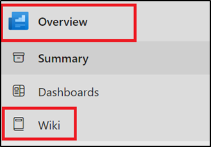
Click Overview and select Wiki page.
-
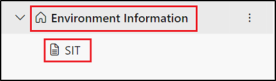
Expand Environment Information and select SIT.
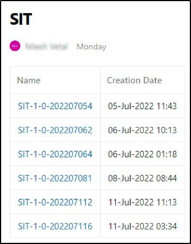
The list of available instances appears.
-
Copy the required instance.
-
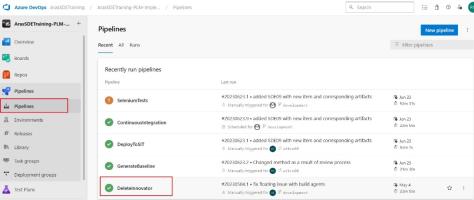
Navigate to Pipelines and select DeleteInnovator pipeline.
-
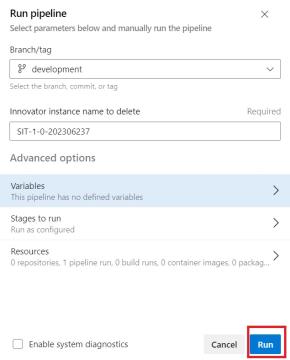
Click Run Pipeline.
-
In the Innovator instance name to delete field, paste the SIT instance which is copied in step 4.
-
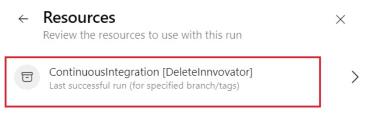
Select Resources and click ContinousIntegration[Delete Innovator].
-
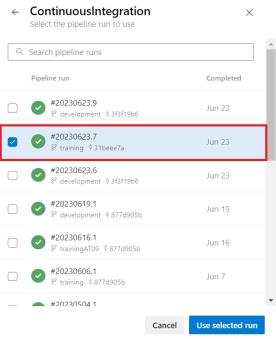
Select the correct build. The build name ends with a timestamp yyyyymmdd##. In the corresponding build, the build number is separated from the date by a dot.
-
Note: The timestamp of SIT instance should match the timestamp of the build.
-
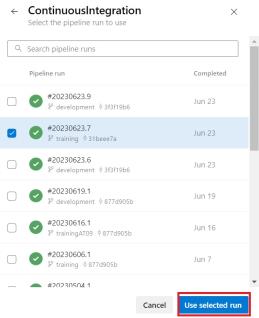
Click Use selected run.
-
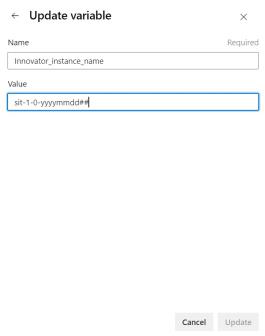
Select Variables enter the value in the Update Variable dialog box. Set the variable in lowercase "sit" and click Update.
-
Navigate back to Run Pipeline pane and click run.
-
If the build has expired, select the oldest green build.