
Create New Dashboard
The following steps outline the process of creating a new Dashboard:
-
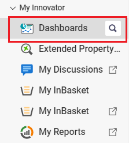
From the Table of Contents, expand My Innovator and select Dashboards.
-
The Dashboard Table of Contents appears. Click Create New Dashboard.
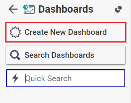
The Dashboard form appears.
-
Enter the Name and Description of the new Dashboard. The Columns field value is 24 by default. Do not change the value of the Columns field.
-
Click Done to save the new Dashboard.