
Parallel Development
In some projects, the implementation team may need to develop multiple features in parallel, some of which may be trials or experiments. Business units or departments may have different and changing priorities to serve.
The implementation team may address these competing parallel wishes by using feature branches and addressing the complexities they pose in project planning and execution.
Additionally, even in the case of sequential development, a Hotfix may come along and pose challenges similar to parallel development.
Development processes are not always linear. Cases such as the one illustrated below arise. Two efforts, potentially by separate teams, need to obtain Functional Qualification Approval, which must take place in the UAT deployment.
Two major concerns to address with parallel development are:
-
How do we maintain the alignment of branches and baselines?
-
How do we test the delta delivery to production?
Review the illustration below.
The Trial effort was deployed to UAT to obtain end-user feedback, believing they would receive it and continue production deployment. However, for whatever reasons, including changes in business priorities the effort marked “Release Candidate” must now go into production earlier. Notice two important aspects of the activity and the impact on schedules and other related project management considerations.
-
To remove Trial from UAT a request must be submitted to Aras to reset UAT with Production if there is already a production deployment.
-
Both efforts share a common baseline with the standard branches provided with each SDE.
-
Both efforts are on different branches in the Work repository.
-
The Trail effort must realign with the production baseline generated after the deployment of the release candidate branch.
-
-
The implementation team has elected to maintain the standard branches in alignment and use feature branches for ongoing efforts. They will only merge into these standard branches during the production deployment (release) process.
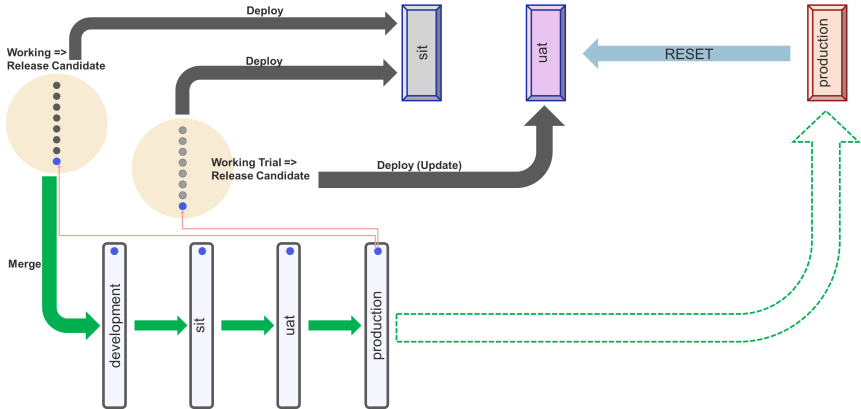
For brevity, the details about realigning the standard branches after a release, while essential, are omitted from this discussion. The green dashed line arrow illustrates that once the production branch and the production environment are aligned, the process can start over for a new cycle.
Release Candidate Flow
Aras established a countdown to summarize the release process and improve coordination with implementation teams.
Aras recommends ongoing maintenance of the standard branches (development, sit, uat, and production) and accepts that project teams may elect other branching strategies.
Independent of the branching strategy adopted by the implementation team, the team must ensure that the release candidate branch (by default, the sit branch) is compatible with the production branch. Compatibility with the production branch is required because all production deployments after the initial deployment use the update strategy (delta deployment).
The implementation team can maintain compatibility with the production branch by merging out (Aras recommends using the rebase option whenever possible) into the development branch on an ongoing basis.
Alternatively, the implementation team can initialize the release candidate branch from the HEAD of the production branch and maintain this alignment throughout the release process.
Aras uses the term release candidate to indicate that, unlike the simplified illustration in Figure 7—Branches and Deployment Types, the release candidate branch may require several modifications to address remediations due to testing in the approval deployments. See GitFlow for additional industry practices on how to maintain these branches.
The release candidate branch provides an approach similar to the transient maintenance branch shown in Figure 9 - Transient Maintenance Branch. In collaboration with Aras, the implementation team uses the branch to create a build to deploy for the various approvals and finally into production. Aras merges the release candidate into the production branch to create a new baseline. > It is essential to note that this process must still obtain the necessary approvals. The implementation team deploys to SIT to test and obtain SQA, they identify the package and request Aras to deploy to UAT with the understand that the Hotfix branch must be merged into uat and production branches as part of the process.
When the deployment to Production is successfully completed, the branch that produced the deployment package can now be merged into the production branch and a new baseline is created to start the next cycle.
Qualification Approvals
The implementation team can complete an SIT type deployment from any branch. This is the main reason for the release candidate concept. The implementation team must establish the pedigree of the deployment package used to obtain the various qualifications.
In Figure 8 Production Deployment Countdown, notice that the SQA is associated with an SIT type deployment produce from the sit branch.
Implementation teams, must address regressions in SIT, merge the resolutions to development and back into sit before the next round of testing.
Based on the impact of the changes, the implementation team and the CSC (Cloud Services Coordinator) secure SQA and request that Aras deploy to UAT. UAT may also require remediation and the implementation team must complete the process of realigning the braches before the final round of UAT.