
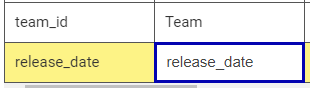
After adding a property to an ItemType and tabbing from the property Name to the property Label there is the annoying behaviour I would like very much to override. I'd rather it stay blank than constantly needing to: Select all, delete, and finally enter a sensible label. I'm only critical of this annoyance because all the default labels are sensible, but whoever put together this auto-label didn't seem to take that into account.
For instance, the default label for "team_id" is simply "Team", and the default label for "release_date" is "Release Date". So, why would tab-to automatically copy the property name?
I'd like if tab to split on underscore and did a caps op on every word. Then, rather than constantly needing to delete the auto-label to enter one that conforms to the default look of out-the-box Innovator IType labels, it would actually be helpful!
This is a quick JS example, and I think if ANY auto-label this should be it:
```
// Change "release_date" property name to desired default-looking, "Release Date":
"release_date".split("_").map(x => x.charAt(0).toUpperCase() + x.substr(1,)).join(' ')
````


