Constraints not working on an integer field form

Hello, I created a new "feedback" ItemType for my users to write remarks about Aras.

I want them to rank the priority of the feedback with an integer from 1 to 5. For this, I created a _priority property in the itemtype which is of type "Integer". I set the range Min to 1 and Max to 5, and checked the "inclusive" box. I also put a value of 1.

Then I created a form and added the _priority as a text field (I first tried with a combobox but it didn't provide any selectable values, I would be happy if you can help me about that too).

The form works well, the default value of 1 is here, but the user is able to enter any kind of integer (200, or even -8) and can still submit the form. I also tried to add a pattern ([1-5], and even/^[1-5]$/) but that didn't change anything, the validation isn't working. Is there something wrong in my databinding?

Does anyone know why? Thank you.

Parents Reply
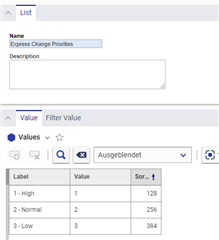
  • Take a look at the Express ECO Form. There is this kind of Priority List used:

    You can use lists to specify these kind of predefined values:

    Just take a look at ItemType and Form "Express ECO" to see how these kinds of list are used. Datasource would be the predefined list. In this case you don´t have Integer values, but you can use the list for filtering and searching.

    You original idea can also work, but from my POV is unnecessary complicated for the use case.

Children
  • 0 オフライン in reply to AngelaIp

    Thanks, creating a list worked. Personally I find that to have to create a list looks more complicated that to simply validate an integer, but I see the Aras philosophy here.

  • Depends on your use case. Sometimes lists are easier. But pattern validation is not uncommon. I use this code in a onLoad Method for a quantity selector, which also stores an integer value:

    var field4 = getFieldByName("_qty");
    var input4 = field4.getElementsByTagName("input")[0];
    input4.setAttribute("pattern","/^-?\d+\.?\d*$/"); 
    input4.setAttribute("maxlength", "4");
    input4.setAttribute("type", "number");
    input4.setAttribute("min", "1");
    input4.setAttribute("max", "300");
    input4.setAttribute("onKeyPress", "if(this.value.length==3) return false;");