
#using "C:/temp/aras2023dlls/bin/IOM.dll"
#using "C:/temp/aras2023dlls/bin/System.Configuration.ConfigurationManager.dll"
#using "C:/temp/aras2023dlls/bin/Aras.Net.dll"

using namespace System;
using namespace System::IO;
using namespace System::Reflection;
using namespace System::Configuration;


void arasDo()
{
  // sample aras code
  System::String ^ url = "http://devaras2023/InnovatorServer/Server/InnovatorServer.aspx";
  System::String ^ database = "InnovatorSolutions";
  System::String ^ user = "admin";
  System::String ^ password = "innovator";


  auto conn = Aras::IOM::IomFactory::CreateHttpServerConnection(url, database, user, password);
  auto result = conn->Login();
  auto s = result->ToString();
}

static Assembly ^
  LoadFromSameFolder(Object ^ sender, ResolveEventArgs ^ args) {
    String ^ folderPath = "C:\\temp\\aras2023dlls\\bin";
    String ^ assemblyPath = Path::Combine(folderPath, (gcnew AssemblyName(args->Name))->Name + ".dll");
    if (File::Exists(assemblyPath) == false)
      return nullptr;
    Assembly ^ assembly = Assembly::LoadFrom(assemblyPath);
    return assembly;
  }

void aras()
{
  // put this somewhere you know it will run (early, when the DLL gets loaded)
  System::AppDomain ^ currentDomain = AppDomain::CurrentDomain;
  currentDomain->AssemblyResolve += gcnew ResolveEventHandler(LoadFromSameFolder);
  arasDo();
}
The exePath does not exist
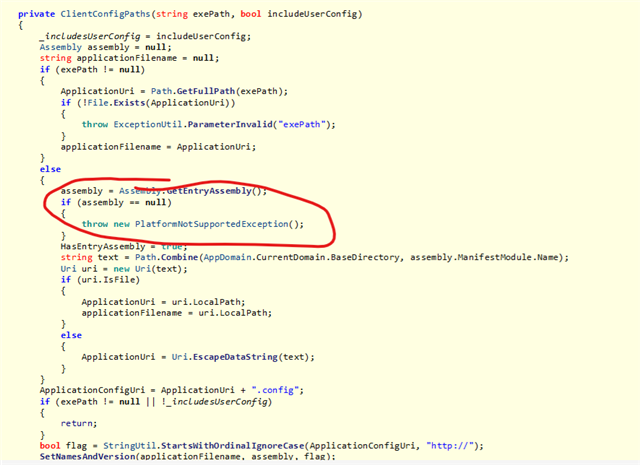
Assembly.GetEntryAssembly() returns a NULL
Can someone explain me how to execute the added cpp sample code so I can load the aras 2023 dlls?


