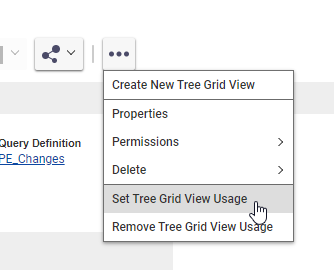
So the Changes tab on part utilizes a Tree Grid View/ Query Definition called PE_Changes. You should be able to instert deviations into the QD just like the other itemypes you see in the query:
Let me know if you have further questions once you start implementing!
Thanks for the quick reply. Can you give me a pointer on how to add Deviation to the QD? I think I had seen this PE_Changes previously, but couldn't figure out how to add another row properly.
I right-click "Root" and "Add Related Item", but none of the three options seem to let me replicate the sort of selections that are in the other rows.
It does seem like it was built in a way that it can't be easily modified. I'd recommend exactly what Chris does in that post you linked. Creating a new Tree Grid View which uses a new Query Definition is probably the quickest way to get the result you're looking for. There are plenty of blogs on making QDs and TGVs, as well as the one Linked by chris for doing reverse lookups.
Thanks. So if I replace PE_Changes with a custom QD, where do I look to use that custom QD instead of PE_Changes to populate that Changes tab on each Part?