
Hi community,
the ItemType definition allows us to specify "Default Searches" for certain properties. I want to specify a "Default Search" that excludes a certain dropdown value when user search in a grid. Something like this works fine for regular properties, but not for dropdowns.
In general, dropdowns right not don´t support that user search with wildcards or use other custom search modes (like exclude). Users only can search with distinct values from the dropdown.
I assume this has to do with the type-ahead behavior of dropdowns. But this is a bit strange, cause similar properties like item and classification selectors allow us to use wildcards and type-ahead.
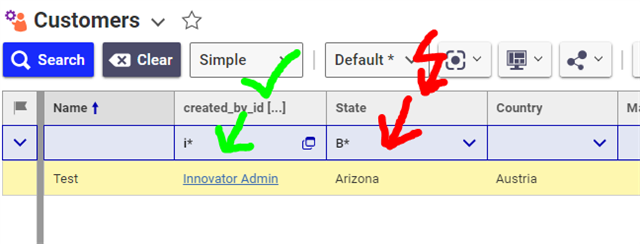
Does anyone know what I need to change to make wildcard searches work for dropdowns?
I checked the Search Mode. The purpose of any Search Mode is to build the AML query for the server to get the data. We probably need to modify it, but right now it doesn´t even receive the search filter. My wildcarded dropdown search value is simply ignored and not included in the AML query.
It seems to be filtered long before the Search Mode itself kicks in. I assume the wildcarded search string makes the input invalid, so the search filter is excluded from the AML query used for the server.
Does anyone know, which codetree files are used to validate the search strings in the blue search row? I made some tests, but so far I haven´t found the right file.
Thanks for any hint!
Angela


