HTML Link - uiShowIntem dont work!!

Hello ARAS colleagues!! After a few months away from the program for work reasons, it seems that we are back to normal.

I have a problem, I am trying to create a link in an html field. The content of the field is filled in dynamically, the hyperlink is created and everything is fine.
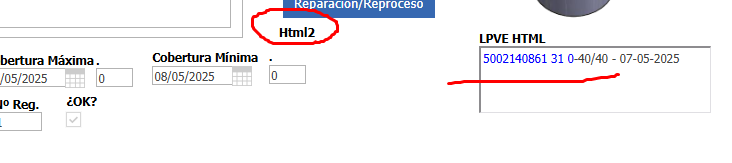
The problem: if I click on the link, the link does not open, a simple "uiShowItem":

function customFunction(id,code, number1, number2) {
aras.uiShowItem("MT Linea PVE", id);
alert(`ID: ${id}, Code: ${code}`);
}

All the data is correct, the id, everything.

The curious thing is, if I open that LPVE manually through the menu or whereused and close it, the next time I click on the link it works. wtf!!

Any suggestions??.

PD: Don't be scared by the appearance of the screen, it's the development screen, :)

Please note that we are using version 11 SP9.

Too many thanks.

Parents
  • Welcome back!  :). 

    That´s a nice user case! I use hyperlinks in Forms but I never thought of embedding them into a text field like this. 

    1. Do you use the code inside a Form html element? 
    2. Does the alert work?
    3. The uiShowItem function is correct. Should work perfectly when you have the id. 


    One idea: Check the Field Order of the html element and the text area. Maybe when the Form is loaded, your text area wants to connect the function, but it doesn´t exist yet.

    If you want to avoid the code into the Form editor, you can also uses an "onLoad" Method with an event listener that checks for click events on your hyperlink. 

  • 0 オフライン in reply to AngelaIp

    Too many thanks Angela. I'm glad to see you "al pie del cañon"l!!! :)

    2. Yes, the alert works perfectly, I put it before or after the uiShowItem, and it shows me the ID correctly, that is, the data arrives correctly.
    3. That's the "strange" thing, if I click on enter it doesn't do anything, but if through the whereuse or the menu, I open the LPVE (Lineas de Orden de Venta) and I close it, the link works correctly. And it opens.

    1. I used an HTML field, which is where I have the style and the function. And a FormattedText field which is where, through an SQL, it fills in the values.

    I don't know how, but by testing, a lot of testing, trial and error, I saw that the FormattedText field took from the HTML field whatever there was, styles, functions, etc.
    I'm going to try your idea. :).

    Basically the text, the links, would be a whereuse of those Manufacturing Orders with their corresponding LPVEs. But they prefer it there and not in a new tab, which would be easier.

    Thanks!!!!

Reply
  • 0 オフライン in reply to AngelaIp

    Too many thanks Angela. I'm glad to see you "al pie del cañon"l!!! :)

    2. Yes, the alert works perfectly, I put it before or after the uiShowItem, and it shows me the ID correctly, that is, the data arrives correctly.
    3. That's the "strange" thing, if I click on enter it doesn't do anything, but if through the whereuse or the menu, I open the LPVE (Lineas de Orden de Venta) and I close it, the link works correctly. And it opens.

    1. I used an HTML field, which is where I have the style and the function. And a FormattedText field which is where, through an SQL, it fills in the values.

    I don't know how, but by testing, a lot of testing, trial and error, I saw that the FormattedText field took from the HTML field whatever there was, styles, functions, etc.
    I'm going to try your idea. :).

    Basically the text, the links, would be a whereuse of those Manufacturing Orders with their corresponding LPVEs. But they prefer it there and not in a new tab, which would be easier.

    Thanks!!!!

Children