I've created a new item type and the tab names show the item ID.

How do I set it to display the value of another property on the item?
Version 11 SP9.
Thanks!
I've created a new item type and the tab names show the item ID.

How do I set it to display the value of another property on the item?
Version 11 SP9.
Thanks!
Hi Henry,
ItemTypes have a property called Keyed_name, which is defined in the ItemType itself. The keyed name is a single or multiple properties, and is set to ID by default.
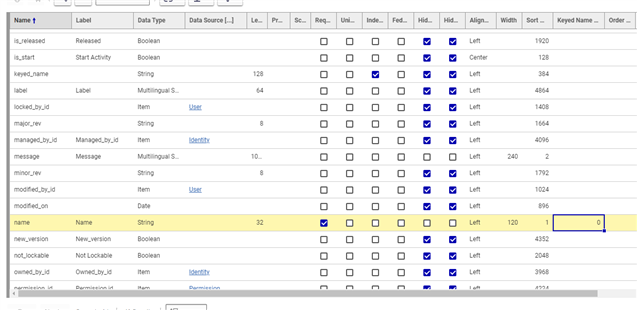
When looking at the properties of an ItemType, there is a column titled Keyed Name Order. This property will set the keyed name of the item. Here's an example for an item which uses it's name property as its keyed name:

It's important to note that the keyed name order starts with zero. If you then were to set the Label property's value to 1, the keyed name would look like {Name} {Label}. A common practice is setting the keyed name to Item Number or Item Number as 0, and Name as 1.
Thanks very much AJ, this is exactly what I was looking for.
Copyright © 2025 Aras. All rights reserved.