Displaying image stored in Report Builder SSRS

Hello,

I'm trying to make a report with SSRS, what I want is to show an image saved in an attribute of an itemtype.
Well, I can't do it, I've tried several methods that I've seen on the internet, chatgpt, but nothing. Can you give me any clues?.
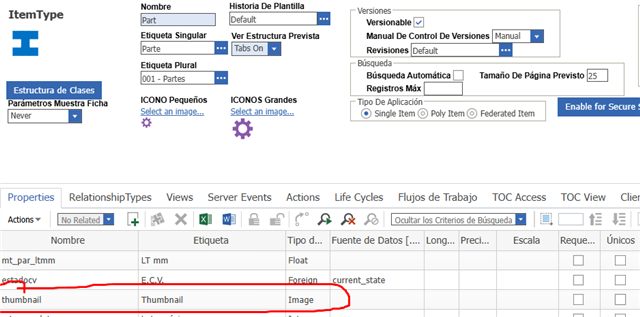
I tried what this post says:

www.aras.com/.../support-q-amp-a---displaying-image-stored-in-vault-in-report-builder-ssrs

But I'm really lost.

There must be an easy way to do it..............

We still have the Aras Innovator Version 11.0 SP9 Build: 6549

Too many thanks!!!!!

Parents
  • I think it should be possible. The post you have found already contains one important piece of the puzzle.

    By using the mentioned credential setting you allow people to access Vault data without the login credentials. People just need to have the correct link. Only use this setting if your company policy allows it! Typically you wouldn´t use it in a public hosted Innovator. 

    The next step is to design your SQL query so it contains the links to the images. There are two types of images. The one in the codetree and the vaulted ones. I assume you mainly have vaulted images.

    Typically a direct vault link looks like this:

    https:// bom /ocalypse/vault/vaultserver.aspx?dbName=TheVoid&fileId=---youridhere---&fileName=myimage.jpg

    Modify your SQL query until you get these kind of links. You probably don´t need the fileName. Well you need it, but a fake value should do the job too.

    Then try these crafted links in the browser before trying the actual report. 

Reply
  • I think it should be possible. The post you have found already contains one important piece of the puzzle.

    By using the mentioned credential setting you allow people to access Vault data without the login credentials. People just need to have the correct link. Only use this setting if your company policy allows it! Typically you wouldn´t use it in a public hosted Innovator. 

    The next step is to design your SQL query so it contains the links to the images. There are two types of images. The one in the codetree and the vaulted ones. I assume you mainly have vaulted images.

    Typically a direct vault link looks like this:

    https:// bom /ocalypse/vault/vaultserver.aspx?dbName=TheVoid&fileId=---youridhere---&fileName=myimage.jpg

    Modify your SQL query until you get these kind of links. You probably don´t need the fileName. Well you need it, but a fake value should do the job too.

    Then try these crafted links in the browser before trying the actual report. 

Children
No Data