Hi tejaswini,
You can configure the "keyed name" (i.e. the display name) for an ItemType's instances using the Keyed Name Order property. Setting a Keyed Name Order value for one or more properties on an ItemType will result in that property/those properties being used as the keyed name.
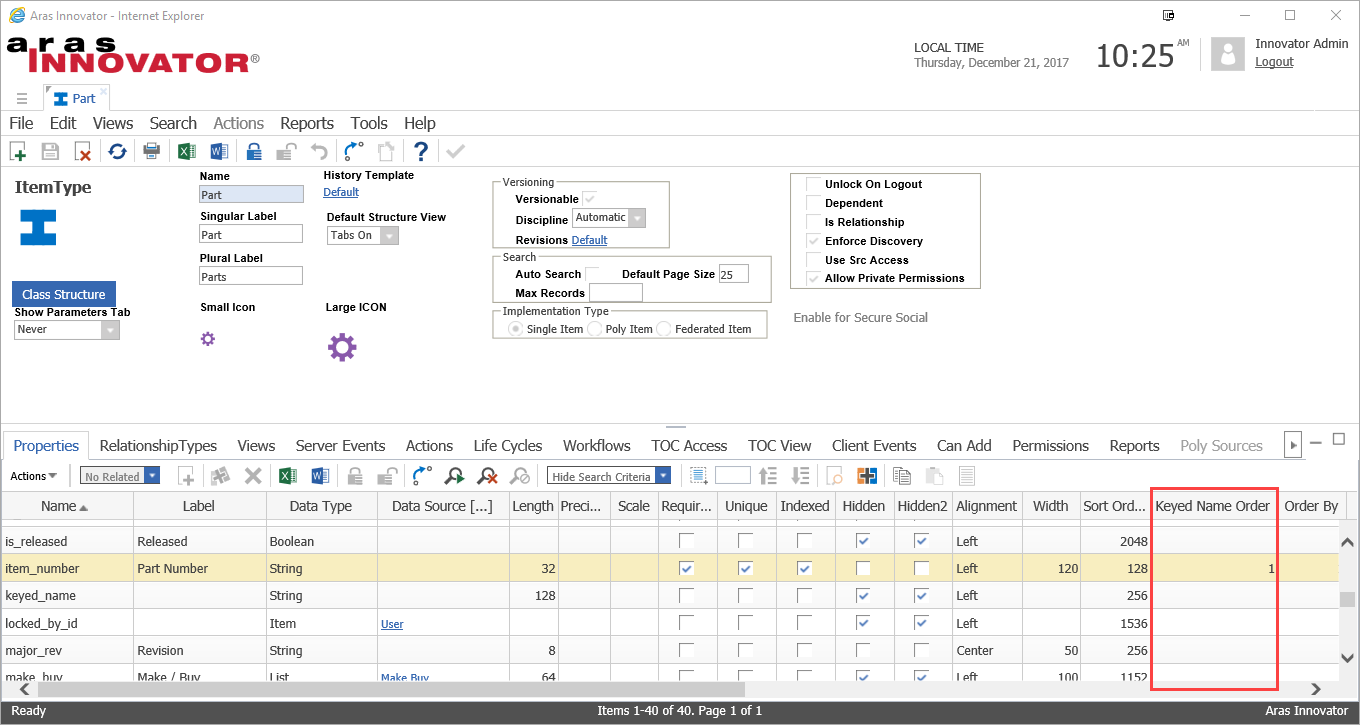
For example, the default Part ItemType has Keyed Name Order set on the item_number property. This means that the item_number property will be set as each Part's keyed name, and it will be used for displaying the item in the Aras Innovator GUI.
If you want to combine multiple properties for an ItemType's keyed name, you can set the Keyed Name Order on multiple properties. Order the values in the order you want the properties to appear in the keyed name.
Eli
Eli Donahue
Aras Labs Software Engineer
Hi tejaswini,
You can configure the "keyed name" (i.e. the display name) for an ItemType's instances using the Keyed Name Order property. Setting a Keyed Name Order value for one or more properties on an ItemType will result in that property/those properties being used as the keyed name.
For example, the default Part ItemType has Keyed Name Order set on the item_number property. This means that the item_number property will be set as each Part's keyed name, and it will be used for displaying the item in the Aras Innovator GUI.
If you want to combine multiple properties for an ItemType's keyed name, you can set the Keyed Name Order on multiple properties. Order the values in the order you want the properties to appear in the keyed name.
Eli
Eli Donahue
Aras Labs Software Engineer

 If you want to combine multiple properties for an ItemType's keyed name, you can set the Keyed Name Order on multiple properties. Order the values in the order you want the properties to appear in the keyed name.
Eli
If you want to combine multiple properties for an ItemType's keyed name, you can set the Keyed Name Order on multiple properties. Order the values in the order you want the properties to appear in the keyed name.
Eli


