I don't see this referenced in the very thick user guide, programmer guide, or ask innovator.
What is the format for simply adding CSS for a form field in the Field CSS tab?
Hi bdc604,
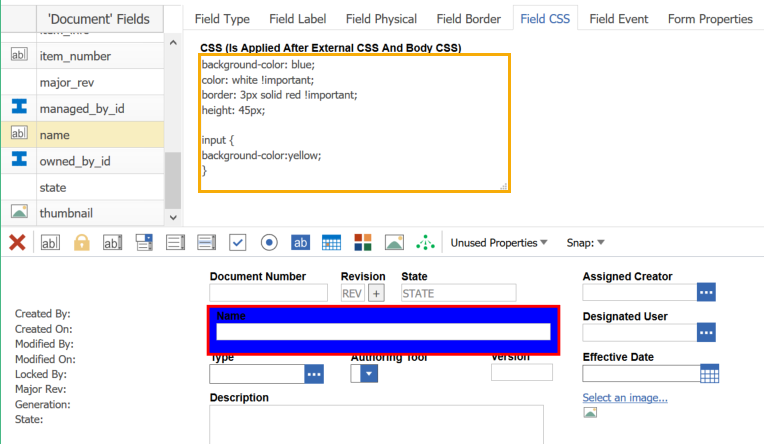
When you add CSS to the Field CSS tab, you are adding rules to the field's container class. You can use this tab to style the container, but not the child elements of the container. Here's an example:
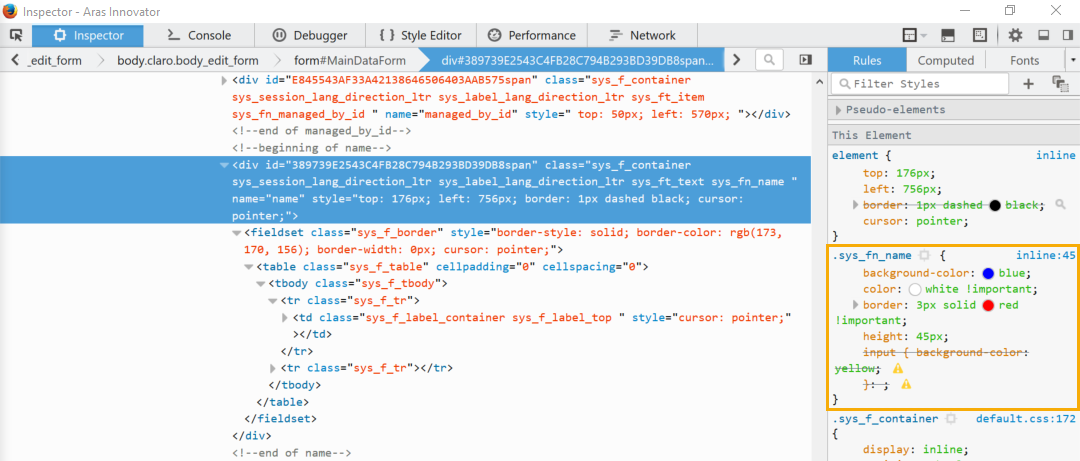
In the example above, I've added a list of CSS rules that modify the container element around the Name field. The rules successfully update the background color, border, and size of the field, but I cannot override the font color of child items (like the label) or use selectors to select child items (like the input element). If we use the F12 developer tools, we can inspect the field container and see the styles applied:
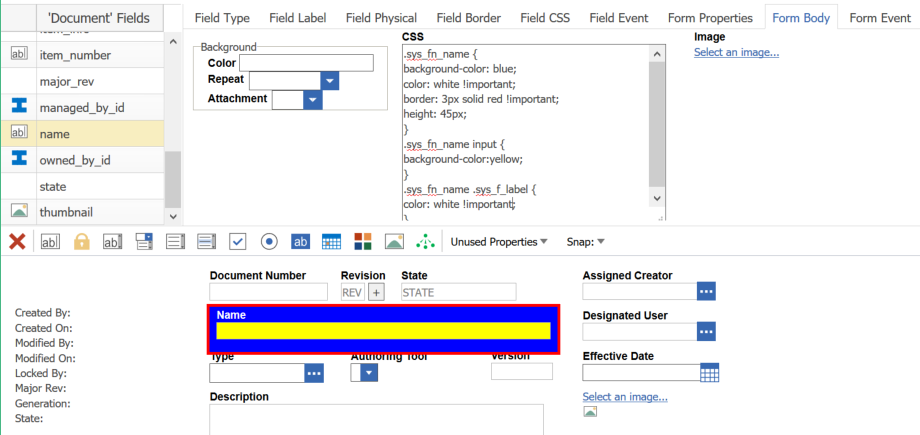
If you want to style child elements of a field container, you can use the CSS field under the Form Body tab. It might take a little trial and error, but you can style specific elements by looking up their class or id in the F12 developer tools. The following example applies the same styles to the field container, as well as child elements like the field's label and input element:
Hope this helps!
Eli
Eli Donahue
Aras Labs Software Engineer
Hi bdc604,
When you add CSS to the Field CSS tab, you are adding rules to the field's container class. You can use this tab to style the container, but not the child elements of the container. Here's an example:
In the example above, I've added a list of CSS rules that modify the container element around the Name field. The rules successfully update the background color, border, and size of the field, but I cannot override the font color of child items (like the label) or use selectors to select child items (like the input element). If we use the F12 developer tools, we can inspect the field container and see the styles applied:
If you want to style child elements of a field container, you can use the CSS field under the Form Body tab. It might take a little trial and error, but you can style specific elements by looking up their class or id in the F12 developer tools. The following example applies the same styles to the field container, as well as child elements like the field's label and input element:
Hope this helps!
Eli
Eli Donahue
Aras Labs Software Engineer

 In the example above, I've added a list of CSS rules that modify the container element around the Name field. The rules successfully update the background color, border, and size of the field, but I cannot override the font color of child items (like the label) or use selectors to select child items (like the input element). If we use the F12 developer tools, we can inspect the field container and see the styles applied:
 If you want to style child elements of a field container, you can use the CSS field under the Form Body tab. It might take a little trial and error, but you can style specific elements by looking up their class or id in the F12 developer tools. The following example applies the same styles to the field container, as well as child elements like the field's label and input element:
 Hope this helps!
Eli
Hope this helps!
Eli


