Hi,
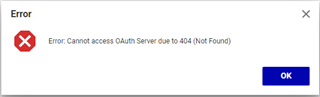
I did a fresh install and cannot login due to OAuth error. I think the configuration of OAuth is broken or missing.
The directory C:\Program Files (x86)\Aras\Innovator12\OAuthServer
does not have a folder .well-known nor an openid-configuration file.
Here's the output of dotnet --info:
C:\>dotnet --info.NET Core SDK (reflecting any global.json): Version: 2.1.803 Commit: ac31cfb390Runtime Environment: OS Name: Windows OS Version: 10.0.14393 OS Platform: Windows RID: win10-x64 Base Path: C:\Program Files\dotnet\sdk\2.1.803\Host (useful for support): Version: 2.1.15 Commit: d43032d4d9.NET Core SDKs installed: 2.1.803 [C:\Program Files\dotnet\sdk].NET Core runtimes installed: Microsoft.AspNetCore.All 2.1.8 [C:\Program Files\dotnet\shared\Microsoft.AspNetCore.All] Microsoft.AspNetCore.All 2.1.15 [C:\Program Files\dotnet\shared\Microsoft.AspNetCore.All] Microsoft.AspNetCore.App 2.1.8 [C:\Program Files\dotnet\shared\Microsoft.AspNetCore.App] Microsoft.AspNetCore.App 2.1.15 [C:\Program Files\dotnet\shared\Microsoft.AspNetCore.App] Microsoft.NETCore.App 2.1.8 [C:\Program Files\dotnet\shared\Microsoft.NETCore.App] Microsoft.NETCore.App 2.1.15 [C:\Program Files\dotnet\shared\Microsoft.NETCore.App]To install additional .NET Core runtimes or SDKs: https://aka.ms/dotnet-download
Hope you can help.
Regards,
Bjoern