CUI Table views not working

We have found a strange issue with the tool. We have found nothing in the available installation guides and support forums, and we would be very grateful if you could help us figure out the underlying issue here.
We have an installation of Aras Innovator 2024 (Build 14.0.25.40942) that was working for a while, but last week, it started to throw error messages whenever we open any table view (e.g. the Requirement table), or we use any user interface feature related to this view, e.g., change pagination size, select a requirement, etc. 
In each case, the error message relates to the favoriteLayoutData settings being not found. More specifically, the following message was emitted:
> The method 'cui_common_layouts_init' failed. favoriteLayoutData.settings is undefined Client Side ErrorError message
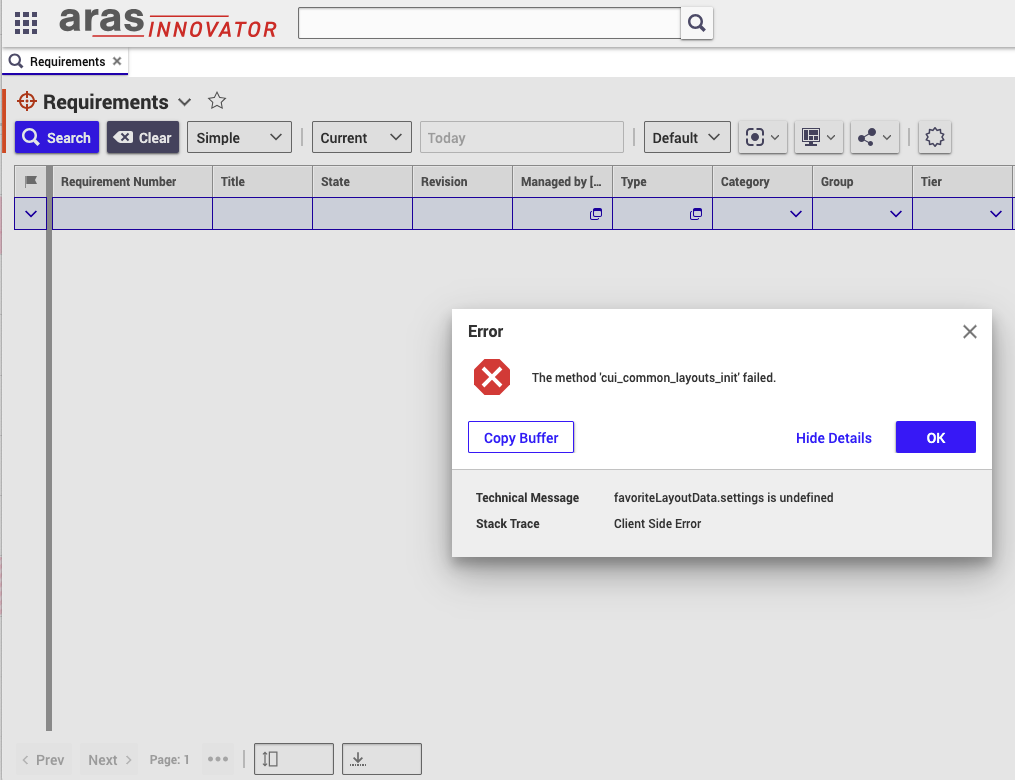
We have tried to reset the user preferences and try it out with another user, different browsers, and cleaning up locally stored cookies, but the issue persisted. We have also checked the server logs but have not found anything that might be helpful.
The issue breaks the user interface quite severely, making it basically unusable, but have no idea where to look for possible causes.
Parents
  • Do you get only this error message or multiple ones?
    Do you get the error message for other ItemTypes too, like Part?
    Have you modified anything CUI related?

    In general it´s a client side issue, you can also check the browser debugger for any potential additional hitns.

    Innovator renders the view (buttons, table, etc.), one element fails which can lead to a cascade of error messages. According to your error message there might be a problem with the favorites. Do you use custom saved searches or favorites? 

  • > Do you get only this error message or multiple ones?

    At any given time, we received a single message like this, but we received the message again if we clicked on basically anything in the table view.


    > Do you get the error message for other ItemTypes too, like Part?

    The same happens with all CUI tables.


    > Have you modified anything CUI related?

    I don't think so. We are evaluating the capabilities of Aras and filled a few requirements with the API, but did not alter the default settings (as far as I know).

    > In general it´s a client side issue, you can also check the browser debugger for any potential additional hitns.

    We tried this, but don't have any context information to make this cost-effective. Any hints about what to watch for would be greatly appreciated.

    > Innovator renders the view (buttons, table, etc.), one element fails which can lead to a cascade of error messages. According to your error message there might be a problem with the favorites. Do you use custom saved searches or favorites? 

    I have initialized a new favorite configuration without any real, but it was removed later as we have seen it is not what we were looking for at the time, while the issue persisted.

Reply
  • > Do you get only this error message or multiple ones?

    At any given time, we received a single message like this, but we received the message again if we clicked on basically anything in the table view.


    > Do you get the error message for other ItemTypes too, like Part?

    The same happens with all CUI tables.


    > Have you modified anything CUI related?

    I don't think so. We are evaluating the capabilities of Aras and filled a few requirements with the API, but did not alter the default settings (as far as I know).

    > In general it´s a client side issue, you can also check the browser debugger for any potential additional hitns.

    We tried this, but don't have any context information to make this cost-effective. Any hints about what to watch for would be greatly appreciated.

    > Innovator renders the view (buttons, table, etc.), one element fails which can lead to a cascade of error messages. According to your error message there might be a problem with the favorites. Do you use custom saved searches or favorites? 

    I have initialized a new favorite configuration without any real, but it was removed later as we have seen it is not what we were looking for at the time, while the issue persisted.

Children
  • These kind of errors there can have many root causes.

    According to the error message this element fails.

    But it doesn´t have to be the truth. The error message can sometimes be misleading. Do you get other messages too?

    At least you can check the favorites:

    Go to "TOC Editor" and add the Favorites ItemType to the TOC. Check out the table. Maybe there is something unusual. I am not sure if it´s wise to delete Favorites manually in Release 2024. In the past they had a dependency to SavedSearches. 

  • I always received the same error message regardless of the UI element I selected.

    And I am sorry, as I noticed I was not deleting a favorite but a custom layout—to be entirely honest, I have not even noticed that the icon is meaningful—each time I click it, nothing happens.

  • It´s normal that nothing happens when you click this element. It´s empty by default (or if rendering fails). 

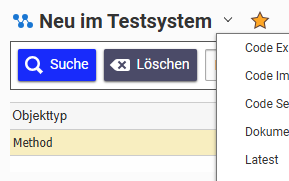
    The basic idea was that you maybe have created a custom Saved Search or Favorite. The list would look like this (in my case I use a couple of Saved Searches in Methods):

    My theory was, that you may have created one of these Saved Searches, but Innovator fails to render the list cause one of them is corrupted for whatever reason. This could lead to the error message. There is a SavedSearch ItemType in the TOC that you can check for any sus content. Same for favorites. 

    It´s a very theoretical idea based on the error message. It doesn´t mean it true. 

    Does each user get the error?

  • We have received the error with multiple users.

    The Saved Searches table is empty; however, I did not find any ItemType named Favorites (or something similar). Is the latter one a problem? If yes, how could I recreate it in the format Innovator expects it?

  • You definitely have Favorites, you just don´t see the it. Innovator doesn´t link every table in the TOC. Go to TOC -> Configuration - TOC Editor. You can add the "Favorites" table temporarily to the TOC. Check out if anything is inside. 

     How old is your instance? Did the error message appear with the Requirements app?

  • The Favorites table was not empty, but the single item it contained was created later than the issue first came forth, and removing it did not solve the issue.

    The instance was created late last year (about October or November, I am not sure), and was only used to evaluate the capabilities of the tool in a very limited way. I don't think the issue is related to the Requirements app itself, as it comes forth on _all_ CUI tables, e.g. I have seen it wrt the Favorites table (making it _extremely_ hard to remove the potentially problematic element, as the error dialog made the popup menu disappear).

  • Ok - not great not terrible. SavedSearch/Favorites was the best guess I had, cause it´s something trivial people do and there was a very small chance for this to be the root cause.

    I am used to these kind of CUI errors during development. The error message sometimes lies a bit. The root cause can be in a complete different corner.

    The error message links to Method item "cui_common_default_layout_init" which links to CUI elements that are used in every single itemtype (that why the error appears everywhere). The error message should come from Method "cui_common_favoritelayouts_init". The first Method loads the complete layout with the favorites being the first element. 

    Do you have played around with the CUI buttons? E.g. removed the "Include Events"?

    As it´s mainly a demo environment if nothing works you can still use a backup of the database. 

  • I don't think we changed anything relevant, but after this thread, I finally bit the bullet and reinstalled Aras (with a new database).

    My problem is that after the reinstallation was finished, even before the Aras Requirements Engineering was added, I managed to reproduce the issue. I wanted to make sure and asked another colleague to test it out, and he got a somewhat different error message: Cannot destructure property 'pagination' of 'favoriteLayoutData.settings' as it is undefined. To me, this might even come from using Chrome instead of Firefox.

    Do you have any other idea what to check? I am out of reasonable ideas.

  • Did you try to use Aras in an inkognito window so definitely no cache data is reused?

    Pagination is the page numbering at the bottom. But I am currently running out of ideas too. 

       Do you have some ideas what could be wrong?

  • Yes, I have tried incognito mode and the colleague I was asking has never used this instance before to avoid any potential caching issues.