
I have a date field in my custom form that is not bound to any item type. The Calendar Control Time selection is disabled by default as the default format is Short date. How do i change this to long date so the time selection is enabled?
Parents
-

Hi
You can configure the time in the Item Type.
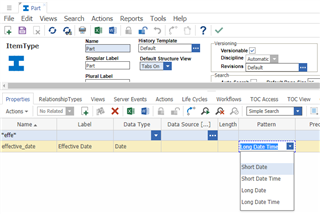
Long Date: Tuesday, January 14, 2019
Short Date: 1/14/2019
Short Date Time: 1/14/2019 9:30:43 PM (Allows User to Select Time)
Long Date Time: Tuesday, January 14, 2019 9:31:41 PM (Allows User to Select Time) -

This works for properties that are bound to an Item Type. But when you are creating a custom form and use a Date control in it, the default calendar that opens when clicking on the icon does not have Time field enabled... Any thoughts?
-

Hello,
This is possible by passing a format parameter into the Date dialog when you open it. You can see all of the available parameters for the different standard Aras dialogs in this blog post. Your updated code will look something like the sample below.
var i18n = aras.IomInnovator.getI18NSessionContext()
var format = i18n.GetUIDatePattern("long_date_time"); // M/d/yyyy h:mm:ss a
var params =
{
// date: origDate, <-- You can use this to pass in a date you want the dialog to start at
format: format,
aras: top.aras,
type: 'Date',
title: 'Select Date',
dialogWidth: 250,
dialogHeight: 250
};
// Open the dialog and do all of your processing belowChris
Christopher Gillis
Aras Labs Software Engineer
-
Hello,
This is possible by passing a format parameter into the Date dialog when you open it. You can see all of the available parameters for the different standard Aras dialogs in this blog post. Your updated code will look something like the sample below.
var i18n = aras.IomInnovator.getI18NSessionContext()
var format = i18n.GetUIDatePattern("long_date_time"); // M/d/yyyy h:mm:ss a
var params =
{
// date: origDate, <-- You can use this to pass in a date you want the dialog to start at
format: format,
aras: top.aras,
type: 'Date',
title: 'Select Date',
dialogWidth: 250,
dialogHeight: 250
};
// Open the dialog and do all of your processing belowChris
Christopher Gillis
Aras Labs Software Engineer
-

This doesn't seems to work. I have a custom form with various fields (text, date and drop down list) and it is not attached to any item type. I'm calling this form from some javascript method but the date is still in short date format. Any help will be much appreciated.
-
I have a custom form with date field. I want date format to be dd/MM/yyyy.
Any help will be much appreciated.
-
Hi Neha
You can use below html in form to get the custom date format
Step 1: In form create two fields (text and html)
Step 2: For Text field, give name as date and Label as Date
Step 3: For HTML field, give name as selectdate and Label as Empty

Step 4: Copy below HTML code
<input name="selectdate" align="absmiddle" style="display: inline; cursor: pointer;" class="sys_f_input_image sys_f_input_image_ie" onclick="myFunction()" type="image" src="../images/calendar.svg" border="0" title="Date Dialog">
</input>
<script>
function myFunction() {
var dateFormat = "dd/MM/yyyy";
params = {
aras: top.aras,
format: dateFormat,
type: "Date"
};
return aras.getMainWindow().main.ArasModules.Dialog.show("iframe", params).promise.then(function(res) {
return updateDatetoText(res);
});
function updateDatetoText(dt) {
var queryDate = dt.replace(" ", "T");
var fillFromDate = document.querySelector("input[name='date']");
fillFromDate.value = queryDate;
}
}
</script>Thank You
Gopikrishnan R
-
Thank you


