Change the color of column in Bom structure

オフライン

Hello Community,

I want to change the color of the column in the BOM Structure if the state is 'Released.' I tried but was unable to find a solution. Does anyone have an idea of how to do it? I am using version 28.

Parents
  • Hello  ,

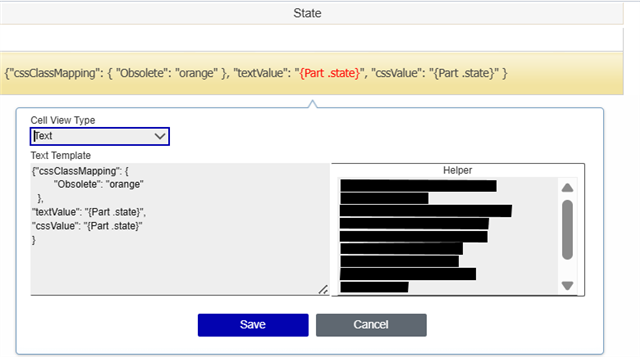
    By using customization you can add background color to specific cell based on state condition.

    It is possible in TGV to color the state cell to those part which has released state.

    In a TGV editor you can apply your custom CSS. Please refer below screenshot.

    As well as you may need to add same css class in "tgvViewer.css" and "tgvViewer.min.css" file.

     Please let me know if anything is required. 

    Regards,

    Suhas

  • Hi  ,

    many thanks for this answer! I was looking for such a solution since years!

    I did an quick test in Innovator 12, but only got the plain text from the "Text Template" in my TGV. The variables for Part.state still worked, but the rest was displayed like regular text. 

    Which Innovator version did you use for this solution? Is this something official Aras introduced in any of the new releases?

Reply
  • Hi  ,

    many thanks for this answer! I was looking for such a solution since years!

    I did an quick test in Innovator 12, but only got the plain text from the "Text Template" in my TGV. The variables for Part.state still worked, but the rest was displayed like regular text. 

    Which Innovator version did you use for this solution? Is this something official Aras introduced in any of the new releases?

Children
No Data