Hello Community,
I want to change the color of the column in the BOM Structure if the state is 'Released.' I tried but was unable to find a solution. Does anyone have an idea of how to do it? I am using version 28.
Hello Community,
I want to change the color of the column in the BOM Structure if the state is 'Released.' I tried but was unable to find a solution. Does anyone have an idea of how to do it? I am using version 28.
Hello Chirag ,
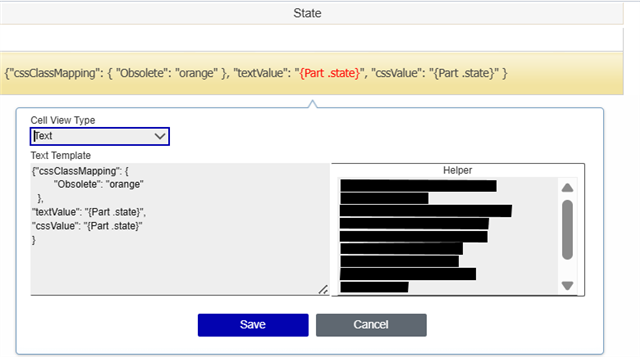
By using customization you can add background color to specific cell based on state condition.
It is possible in TGV to color the state cell to those part which has released state.
In a TGV editor you can apply your custom CSS. Please refer below screenshot.
As well as you may need to add same css class in "tgvViewer.css" and "tgvViewer.min.css" file.
AngelaIp Please let me know if anything is required.
Regards,
Suhas
Hi Suhas ,
I tested this on R31 and saw the same behavior Angela described. Do you perhaps have other customizations in the code tree?
I think I know how the solution might look like. It should be an I14 a code tree mod. I assume it´s similar to the way "item property" renderings work (icon + link + link styling).
I don´t want to test this one in my Innovator 12, cause the TGV code has changed a lot between I12 and I14. But I will give it a try as soon I have access to some I14.
I think I know how the solution might look like. It should be an I14 a code tree mod. I assume it´s similar to the way "item property" renderings work (icon + link + link styling).
I don´t want to test this one in my Innovator 12, cause the TGV code has changed a lot between I12 and I14. But I will give it a try as soon I have access to some I14.
Copyright © 2025 Aras. All rights reserved.