Multiple sessions created for trivial actions like "edit". What can be the reason?

Hi community,

would be great if somebody could help me with following issue with Innovator 12SP7!

I noticed that one of my users appears with many sessions in the [application].[ACTIVEUSER] table in the database. The same user also complains that Innovator is very slow in certain scenarios. For example changing the "Make/Buy" drop-down in the Part Form can last up to 5 seconds. Opening a custom Impact Matrix with a few hundred Affected Items can take several minutes (typical would be 3-5 seconds). 

I am right now confused why this specific user appears with an excess amount of sessions in the list. Typically people are only listed with a few sessions. I wonder if the amount of listed sessions and the users´ performance problems are somehow related? 

The table looks like this:
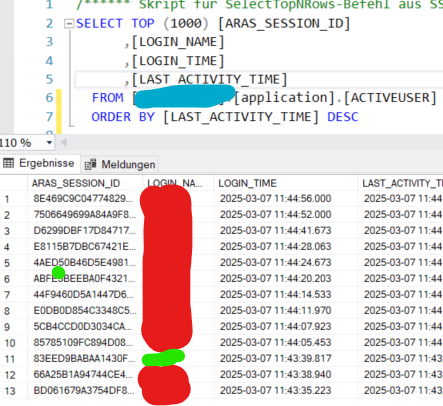
Red is always the same user. Green is somebody else.

I did some tests with the user. One new connection is created when he starts Innovator. Regular searching does not create any new session. But a new session appear as soon as he opens a Parts and clicks the "Edit" button!

For each "Edit" click a new session was created! But only for this specific user. If I do administration stuff in Innovator (editing ItemTypes, Method, etc.) no additional sessions are created. I hardly appear in the session list at all. 

Side notes:

- No browser extensions used. Session cookies are not blocked or removed
- We tested Firefox and Edge
- Other users only have one or a small amount of sessions
- New connections appear for file operations (thumbnails and regular file upload). But these sound legit. 

Does anyone has an idea what can cause this behavior? Is this normal?

Thanks for any help!

Angela

Parents
  • I noted that the main reason for the additional connections are probably the thumbnail images that we use in Parts. If I open a Part with a vaulted thumbnail, a new connection is established.

    I am actually familiar with this thumbnail specific detail. It´s a known behavior of Aras Innovator and I remember I had discussions with support about this one years ago. Since a few years I ignore the issue cause it didn´t do much harm.

    Main question: Is it actually something that was fixed?
    I tried to reproduce the issue in 12SP10 and I23, but I hardly were able to reproduce it all. So I think it´s something specific in this Innovator version 12SP7

    This may not fix the speed problems of my affected users, but maybe is an important hint to solve the puzzle

  • I want to determine if this issue is something typical across multiple Innovator versions.

    @ Community: It would be great if you could check whether this specific session behavior also occurs in your environment! Only 5 minutes required!

    Innovator 11 users are kindly invited too! I remember this behavior from 11SP9 and 11SP15. 

    All you need to do is follow the test instruction and than post the result with your Innovator version number.

    Preconditions

    - You need to have access to the database in SSMS
    - You need to have Parts with thumbnails.

    Please don´t do the test if you have zero experience in the SQL environment!

    Test setup

    1. Open SQL Server Management Studio (SSMS)
    2. Find your database and navigate to "tables"
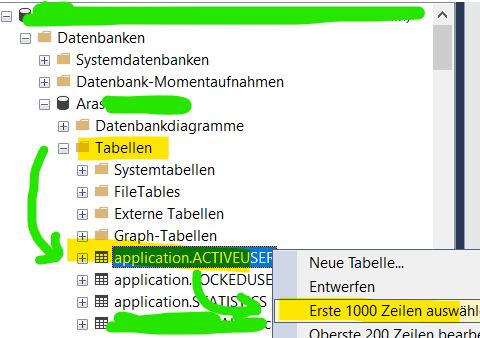
    3. Select table "application.ACTIVEUSER" -> right-click -> Click "Select the first 1000 rows"

    4. You get the SQL query that is shown in my initial post
    5. Execute the SQL query
    6. You will get a list of the latest session. Maybe sort the result by descending "Login_Time"

    The actual test

    1. Login to Innovator.
    2. Open 3-10 Parts with vaulted thumbnails. 
    3. Go back to SSMS and execute the query again. 
    4. Check if your user appears with multiple sessions.
    5. Post your result here in this forum. E.g. "I tested Release 34 and no additional sessions were created". 

    Thanks in advance!

    Angela

Reply Children