CUI Table views not working

We have found a strange issue with the tool. We have found nothing in the available installation guides and support forums, and we would be very grateful if you could help us figure out the underlying issue here.
We have an installation of Aras Innovator 2024 (Build 14.0.25.40942) that was working for a while, but last week, it started to throw error messages whenever we open any table view (e.g. the Requirement table), or we use any user interface feature related to this view, e.g., change pagination size, select a requirement, etc. 
In each case, the error message relates to the favoriteLayoutData settings being not found. More specifically, the following message was emitted:
> The method 'cui_common_layouts_init' failed. favoriteLayoutData.settings is undefined Client Side ErrorError message
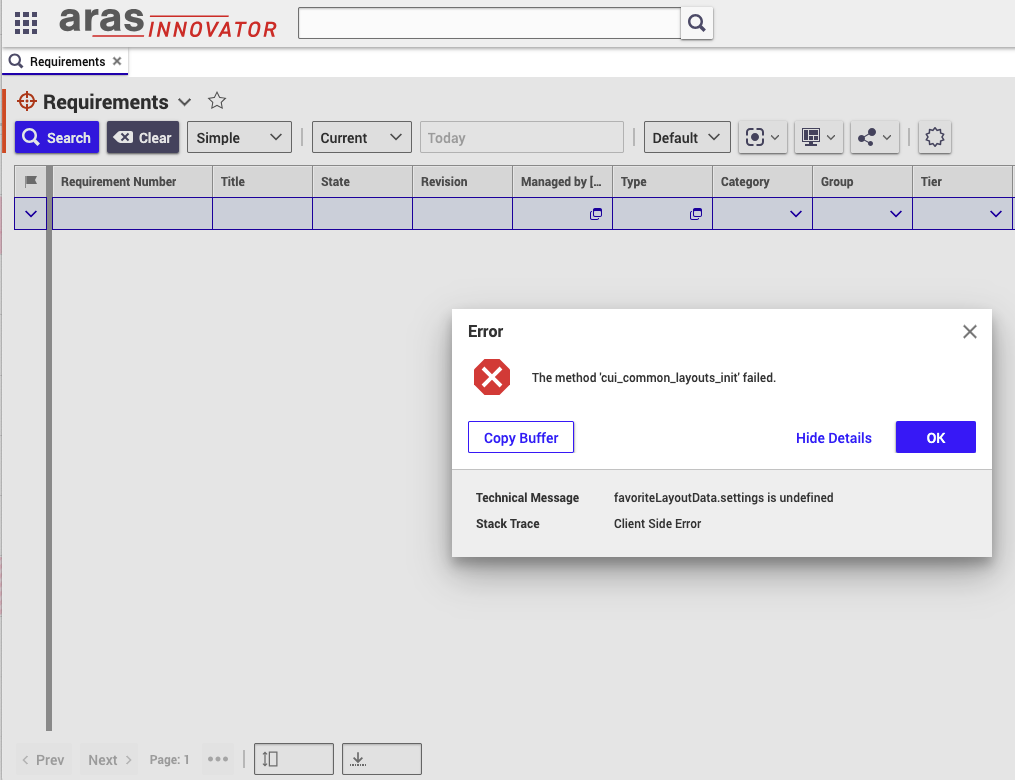
We have tried to reset the user preferences and try it out with another user, different browsers, and cleaning up locally stored cookies, but the issue persisted. We have also checked the server logs but have not found anything that might be helpful.
The issue breaks the user interface quite severely, making it basically unusable, but have no idea where to look for possible causes.
Parents
  • Do you get only this error message or multiple ones?
    Do you get the error message for other ItemTypes too, like Part?
    Have you modified anything CUI related?

    In general it´s a client side issue, you can also check the browser debugger for any potential additional hitns.

    Innovator renders the view (buttons, table, etc.), one element fails which can lead to a cascade of error messages. According to your error message there might be a problem with the favorites. Do you use custom saved searches or favorites? 

  • > Do you get only this error message or multiple ones?

    At any given time, we received a single message like this, but we received the message again if we clicked on basically anything in the table view.


    > Do you get the error message for other ItemTypes too, like Part?

    The same happens with all CUI tables.


    > Have you modified anything CUI related?

    I don't think so. We are evaluating the capabilities of Aras and filled a few requirements with the API, but did not alter the default settings (as far as I know).

    > In general it´s a client side issue, you can also check the browser debugger for any potential additional hitns.

    We tried this, but don't have any context information to make this cost-effective. Any hints about what to watch for would be greatly appreciated.

    > Innovator renders the view (buttons, table, etc.), one element fails which can lead to a cascade of error messages. According to your error message there might be a problem with the favorites. Do you use custom saved searches or favorites? 

    I have initialized a new favorite configuration without any real, but it was removed later as we have seen it is not what we were looking for at the time, while the issue persisted.

  • Yes, I have tried incognito mode and the colleague I was asking has never used this instance before to avoid any potential caching issues.

  • I am able to reproduce the error message when I damage the Method cui_common_layouts_init intentionally (e.g. bei removing lines that have to do with "options". This of course doesn´t help your problem.

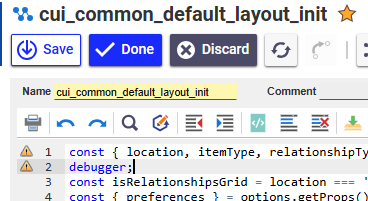
    You could try to add a "debugger" statement to the Method.

    You might get error messages when editing this one, but just restart Aras after.

    Then open the browser console F12 before opening any search grid. Then open the search grid. You should see the code in the browser debugger. You can step through the code. Maybe you can determine the line in the code where the method fails. 

    @Community: Does somebody else has a better idea?

  • I did a quick search on reported bugs. It doesn't seem like it's exactly this issue, but sometimes a misconfigured oauthserver/oauth.config has caused this error to occur in previous versions. Take a look at that file and make sure that the below entries exist in your clientRegistries.

    <clientRegistry id="InnovatorClientServer" enabled="true">
    				<secrets>
    					<secret type="JwtBearerAssertionServerSecret">
    						<certificate filePath="App_Data/Certificates/InnovatorClientServer.cer"></certificate>
    					</secret>
    				</secrets>
    				<allowedScopes>
    					<scope name="Innovator"></scope>
    				</allowedScopes>
    				<allowedGrantTypes>
    					<grantType name="impersonate"></grantType>
    				</allowedGrantTypes>
    				<tokenLifetime accessTokenLifetime="3600"></tokenLifetime>
    			</clientRegistry>
    			<clientRegistry id="ConversionServer" enabled="true">
    				<secrets>
    					<secret type="JwtBearerAssertionServerSecret">
    						<certificate filePath="App_Data/Certificates/ConversionServer.cer"></certificate>
    					</secret>
    				</secrets>
    				<allowedScopes>
    					<scope name="Innovator"></scope>
    				</allowedScopes>
    				<allowedGrantTypes>
    					<grantType name="impersonate"></grantType>
    				</allowedGrantTypes>
    				<tokenLifetime accessTokenLifetime="3600"></tokenLifetime>
    			</clientRegistry>
     

    It's very possible this isn't the issue, but figured it's worth checking. 

  • I have checked the config file, and it contains these two clientRegistry entries as is (and has other ones as well). The only thing I have changed in this file is extend the list allowed redirectUris related to our infrastructure.

  • In your first post you said it worked for a while. How long is "for a while"? The oauth.config mentions certificates. Innovator certs can expire (but you would get different error messages). Expiring certificates definitely can make trouble, but they lead to totally different error messages. Release 2024 isn´t even old enough to be affected.

    Other general ideas of low chance of being any help:

    - Do you use browser extension that block JS?
    - Are the browser more or less up-to-date (old browsers would have trouble with certain JS code). 

  • For a few months after installation, it stopped working. I found an issue related to default layouts that fixed it for about a week; since then, it has been broken. We have no idea what went wrong.

    I tried to turn off all browser extensions to avoid issues, and I was using multiple, up-to-date browsers, e.g., the latest Chrome, the latest Firefox, and the latest Firefox ESR, and the problem persisted in all of them (in the case of Chrome, the error message was worded a bit differently, but it was basically the same).

  • Which identity / user do you use for your tests? 

    Is there really nothing in the browser console? 

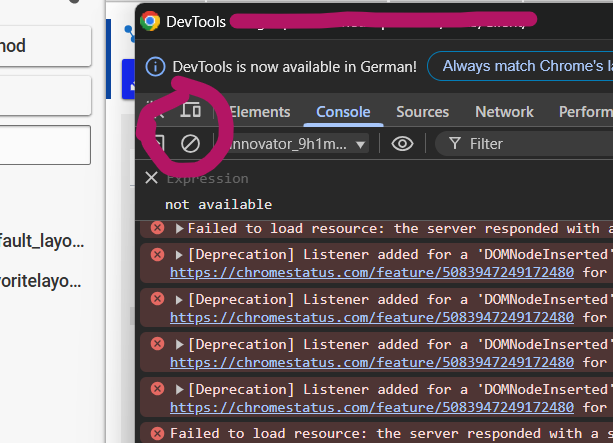
    In this debugging view, erase all existing notifications so you have a clean view to start with. Then leave the window open and open your search grid. Maybe you get something:

  • Sorry for the slow response here, I did not receive a notifiation of this comment. I looked at the console as you have mentioned, and I did not seem anything that seems relevant to me, but I am pasting the results in (with anonimizing the server ip address from the logs):

    Layout was forced before the page was fully loaded. If stylesheets are not yet loaded this may cause a flash of unstyled content. itemsGrid.html
    Source map error: request failed with status 404
    Resource URL: http://«ip.addr»/InnovatorServer/Client/X-salt=std_14.0.25.40942-X/javascript/include.aspx?classes=ArasModules
    Source Map URL: core.js.map

    Source map error: request failed with status 404
    Resource URL: http://«ip.addr»/InnovatorServer/Client/X-salt=std_14.0.25.40942-X/javascript/include.aspx?classes=ScriptSet6
    Source Map URL: searchConverter.js.map

    Source map error: No sources are declared in this source map.
    Resource URL: http://«ip.addr»/InnovatorServer/Client/X-salt=std_14.0.25.40942-X/jsBundles/components.es.js
    Source Map URL: components.es.js.map

    The character encoding of a framed document was not declared. The document may appear different if viewed without the document framing it. spinner.html
    Layout was forced before the page was fully loaded. If stylesheets are not yet loaded this may cause a flash of unstyled content. spinner.html
    Synchronous XMLHttpRequest on the main thread is deprecated because of its detrimental effects to the end user’s experience. For more help https://xhr.spec.whatwg.org/#sync-warning _i18nMixin.js:20:12
  • Unfortunately, I don't see anything useful there either.

    I notice X-salt=std which tells me that you never intentionally modified the codetree. Incognito mode would by pass the cache value anyway.

    Is it possible that somebody played around with the codetree files in the installation folder? 

  • I don't think so, especially that I have replaced the entire codetree when reinstalling Innovator. The files should be as the installer created them.

Reply Children